
A warning for developers, freelancers, and digital agencies working through freelance marketplaces.
Imagine receiving a message from a potential client. They have an existing application with a few bugs. They share a Google Drive link containing the source code and ask you to review the project, fix the issues, and provide a quote.
The request seems completely normal. The application looks legitimate. The reported bugs actually exist. There is documentation, a familiar framework, and a clear list of tasks.
But hidden inside the project could be something far more dangerous than broken code.
The application itself may be the attack.
How the Attack Works
This technique combines social engineering with a software supply-chain attack. Rather than sending an obvious malicious executable, an attacker disguises potentially harmful code inside what appears to be a normal development project.
1. A convincing project request
The attacker poses as a genuine client on a freelance marketplace and requests help with an existing application. The project can contain real, identifiable bugs, making the work appear legitimate.
2. The source code arrives through a familiar link
The developer receives a Google Drive folder or ZIP file containing the application. Google Drive is only the delivery mechanism: the risk lies in what the downloaded project may execute.
3. An unfamiliar dependency is hidden in the project
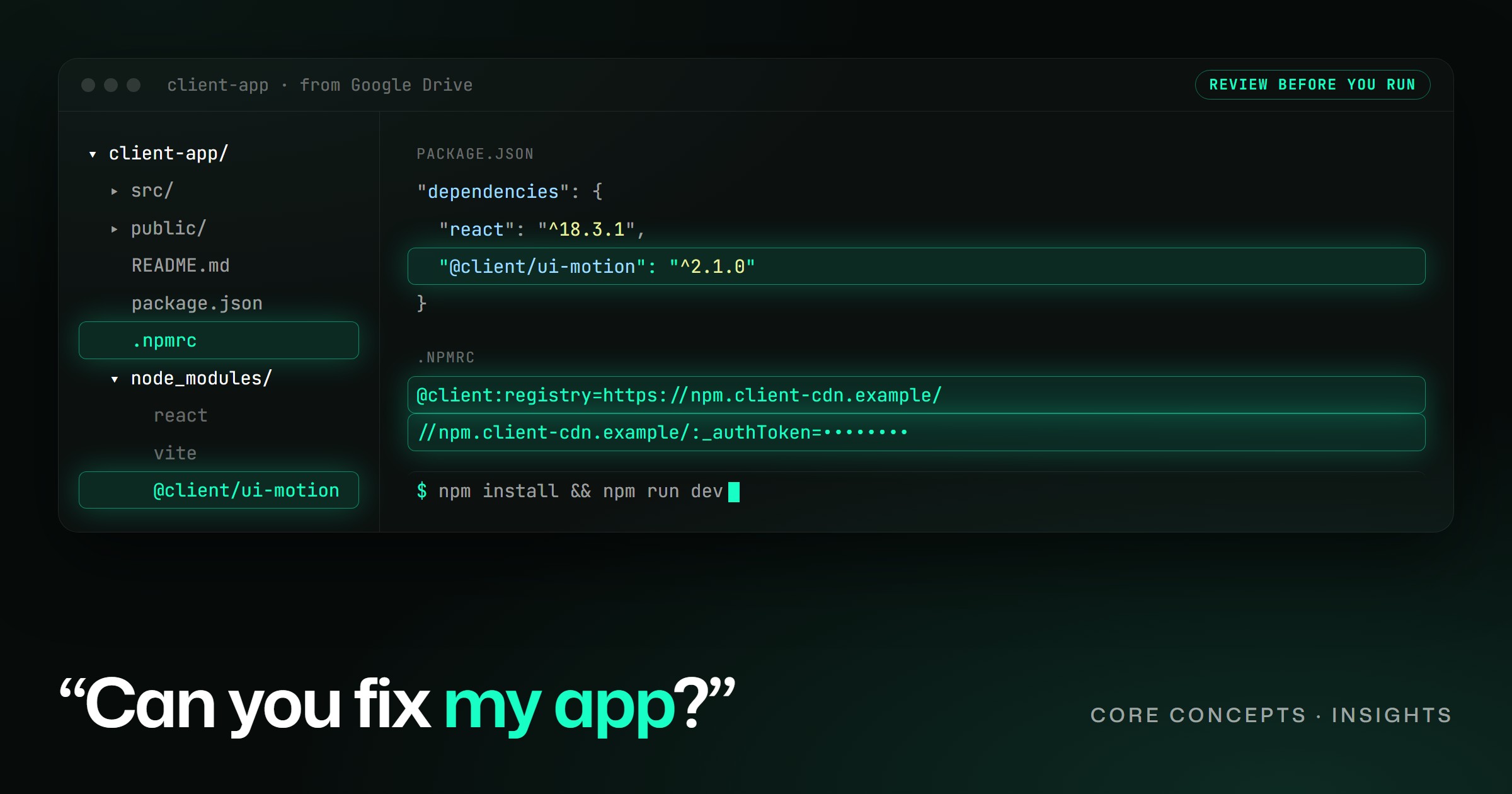
Among the ordinary application files is a package that looks like a harmless UI utility, animation library, or development dependency. It may not even be used by the application's visible features.
4. The suspicious functionality is concealed one level deeper
The visible package can look benign while attempting to load another dependency that is not publicly accessible. A project-level configuration file may include credentials or registry settings that enable access to this hidden dependency.
This arrangement can make the dangerous component harder to identify through a superficial code review or inspection of public package listings.
5. The developer triggers code execution through a normal workflow
A developer might install dependencies, start the development server, and reproduce the reported bugs. But package installation scripts, build plugins, and imported configuration modules can execute code during these steps.
The attacker may not need the developer to open an executable. They may only need the developer to run the project.
Why This Is Particularly Dangerous
Developer workstations often contain access to more than a single application. Depending on the payload, a compromised environment could expose:
- Browser sessions and saved credentials
- SSH keys and source-code repository access
- API keys and secrets stored in environment files
- Cloud infrastructure and hosting credentials
- Cryptocurrency wallets
- Client projects and connected systems
A single compromised workstation could therefore put multiple client environments at risk. These are potential consequences of this attack class, not confirmed actions of any specific unexamined payload.
What Makes the Trap Convincing?
The application may be functional. The bugs may be real. The documentation may look professional. The requested work may resemble assignments developers handle every week.
The suspicious behavior is separated from the apparent business request and placed in the project's dependency or configuration chain.
The developer's normal workflow becomes the potential entry point.
How Developers Can Protect Themselves
- Inspect dependencies before installation. Review
package.json, lockfiles, scripts, and unfamiliar packages. - Check project configuration. Examine
.npmrc, build configurations, registry overrides, tokens, imports, and commands that may execute during startup. - Trace transitive dependencies. A publicly visible package may load additional packages or code from other sources.
- Use a disposable, isolated environment. Keep untrusted projects away from personal credentials, client files, SSH keys, and production systems. A sandbox must be configured carefully; a container alone is not a guarantee of safety.
- Do not run install or development commands blindly. Commands such as
npm installandnpm run devmay trigger scripts, plugins, or configuration code. - Treat pressure and evasiveness as warning signs. Urgency alone does not prove malicious intent, but it is a reason to increase scrutiny.
- Report credible suspicious activity. Notify the freelance platform and relevant package registry, providing evidence without publicly sharing secrets or malicious files.
What If You Already Ran the Project?
If you suspect malicious code executed, stop using the affected environment for sensitive work. Disconnect it from networks where appropriate, involve your security team or a qualified incident responder, and use a separate trusted device to revoke exposed sessions, rotate passwords and API tokens, and replace potentially compromised SSH keys. Assess any client systems that may have been accessible. Merely downloading or viewing files does not, by itself, establish that code executed, but files should still be handled cautiously.
A Final Thought
Developers are trained to find bugs and vulnerabilities in the applications they build. Increasingly, they also need to scrutinize the applications they are asked to work on.
A project can look professional, contain legitimate code, and present genuine technical problems while still being designed to compromise the person investigating it.
Before you debug someone else's application, make sure the application isn't designed to compromise yours.
Core Concepts · Brand · Web · AI