
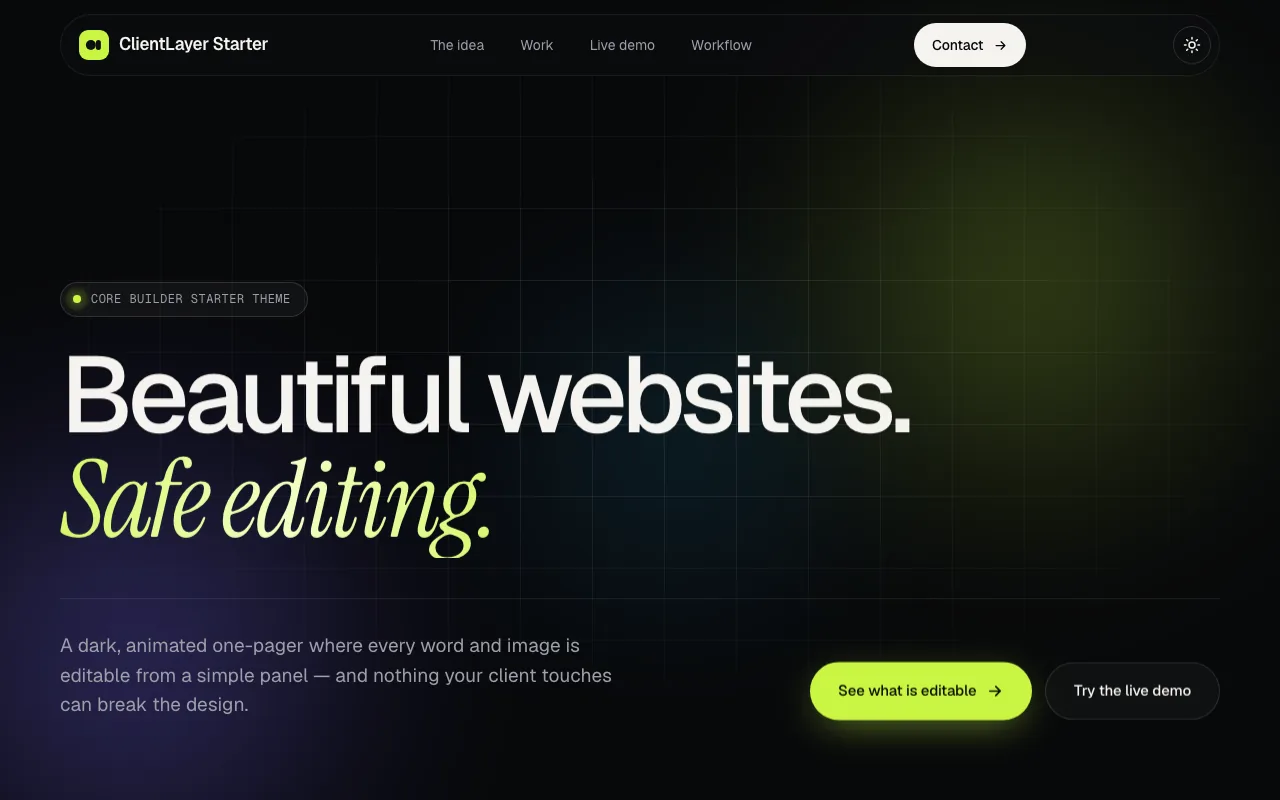
Core Builder lets clients edit their site without breaking it.
Our websites are built in code, with AI as a pair programmer. Core Builder is what makes them safe to hand over: the theme declares exactly what a client may change, and the client edits text, pictures and links from a simple panel or by clicking the live page. Layout, spacing and styles stay out of reach.
- 7field types, each cleaned on save
- 134editable fields on the starter theme
- 10versions kept of every field
- 1command to check, test and deploy
Real recording: click-to-edit on our starter theme, in a local WordPress.
The brief
Page builders let clients break the one thing we were hired to design.
A client needs to change a price, a photo or an opening line next week. A page builder lets them, and it also lets them move a column, shrink a heading or paste in a script.
We wanted custom design in plain code, built quickly with AI, and a client who can still change their own content the same day. So the editing layer had to come from the code itself, with rules no one could skip.
- Clients change content only: text, pictures, buttons and links. Never layout, spacing, colours or structure.
- The theme declares what is editable, so the editor builds itself and can’t drift from the code.
- Nothing reaches a live site without being checked first.
- Every change can be undone, and the client account can’t reach anything that would break the site.
How it works
Four steps. The AI writes, the tools check.
Shown with real runs on a local WordPress: the starter theme our sites begin from, checked, deployed and edited.
- 01
Build
Every site starts with a brief. Our AI coding assistant reads the client’s materials, writes the project up and stops for approval. Only then is the theme built, in plain code, to a written contract: every word a client may change goes through a template tag with a default, and nothing about layout is ever exposed.
The contract, in five rules
- 01Every word a client may change goes through a template tag.
- 02Every tag carries its default, so the site is right before anyone edits.
- 03Layout, spacing, colours, fonts and structure are never editable.
- 04Pictures come from the Media Library, never from other sites.
- 05Scan, then validate, and fix every error before it ships.
- 02
Check
The scanner reads the code and writes the field list; the validator checks the list against the code in both directions. In this real run a new line was added to the hero but not to the list: validate stopped it, scan added it, and validate passed.
A real check · one new line in the hero
In the code
- hero.eyebrow
- hero.title_line1
- hero.title_line2
- hero.description
- hero.offer
- hero.button_text
In the field list
- hero.eyebrow
- hero.title_line1
- hero.title_line2
- hero.description
- hero.offer
- hero.button_text
✕Validate stops it: hero.offer is not in the field list
✓Scan adds it. Validate passes: 135 fields
- 03
Deploy
One command validates the theme, checks every code file for errors, packs it and sends it to the site, where it is installed and activated. One error stops everything before upload.
Two real deploys · one missing bracket, then fixed
- front-page.php✓
- header.php✓
- footer.php✓✕
- functions.php✓
- style.css✓
Error checkfooter.php, line 15: unexpected “;”Every file passesLive siteDeploy stopped. Nothing was uploaded.Deployed and activated, 134 fieldsOne bad file in an active theme takes a whole site down, so an error always stops the deploy
- 04
Edit
The client logs in as a Client Editor and sees a Website menu: one entry per page, built from the field list. Or they switch on Edit site, click any outlined text, picture or link on the live page, and type. Every save is cleaned, checked and kept in the history.
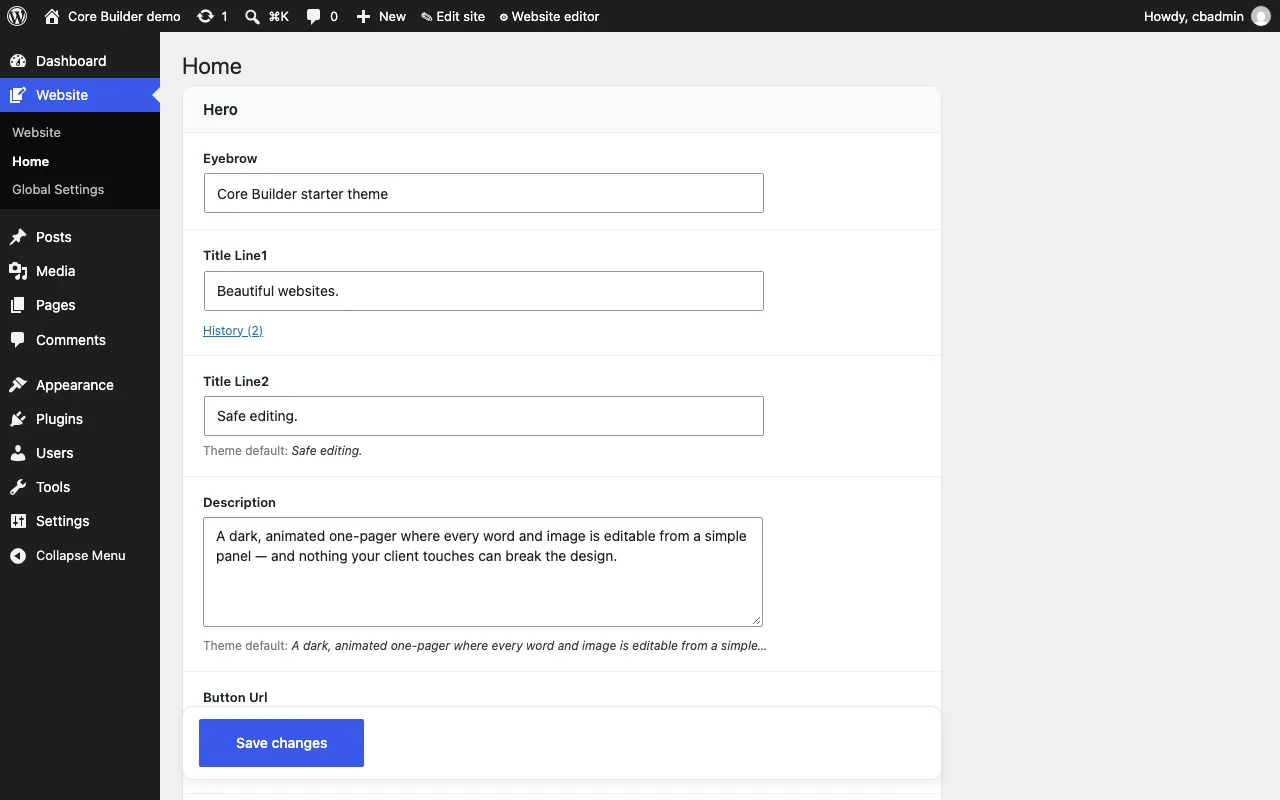
The Website panelbuilt from the field list 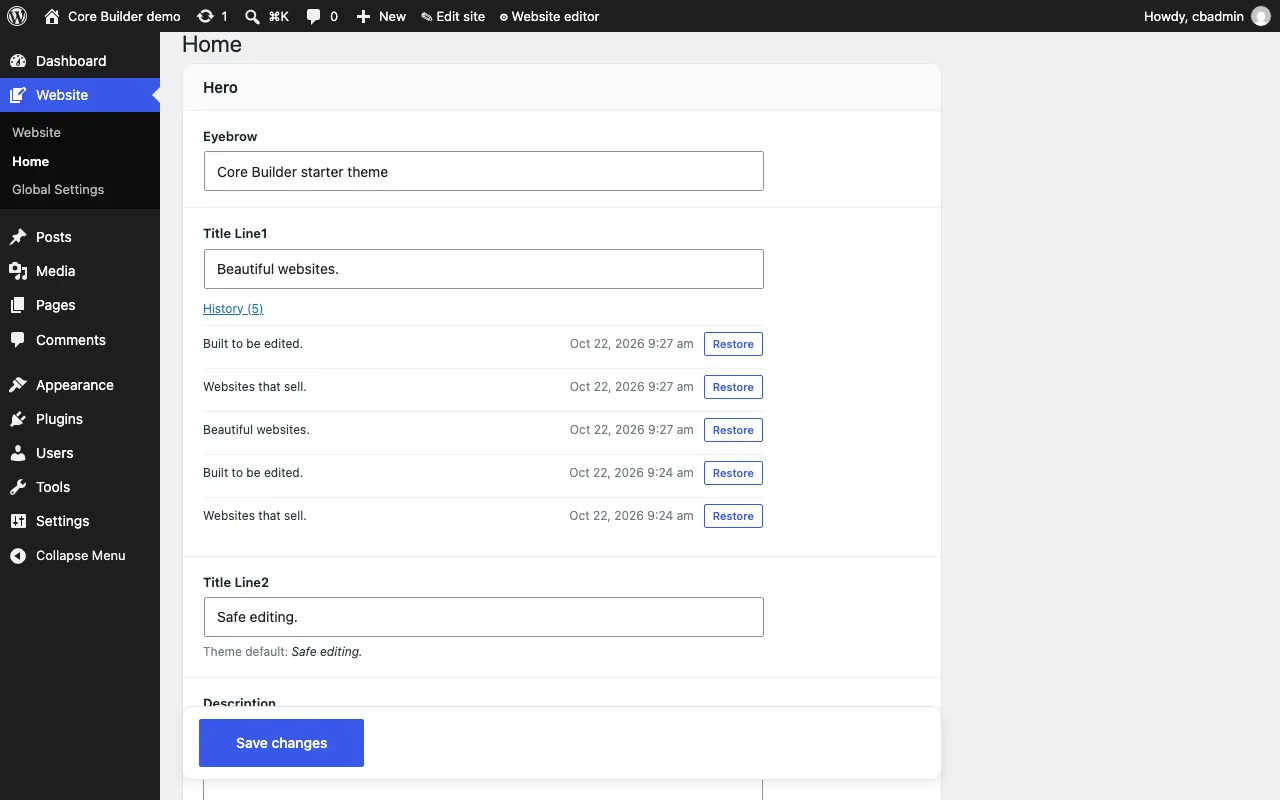
Historyten versions of every field Every save is cleaned, checked and kept
The contract, in five rules
- 01Every word a client may change goes through a template tag.
- 02Every tag carries its default, so the site is right before anyone edits.
- 03Layout, spacing, colours, fonts and structure are never editable.
- 04Pictures come from the Media Library, never from other sites.
- 05Scan, then validate, and fix every error before it ships.
A real check · one new line in the hero
In the code
- hero.eyebrow
- hero.title_line1
- hero.title_line2
- hero.description
- hero.offer
- hero.button_text
In the field list
- hero.eyebrow
- hero.title_line1
- hero.title_line2
- hero.description
- hero.offer
- hero.button_text
✕Validate stops it: hero.offer is not in the field list
✓Scan adds it. Validate passes: 135 fields
Two real deploys · one missing bracket, then fixed
- front-page.php✓
- header.php✓
- footer.php✓✕
- functions.php✓
- style.css✓
One bad file in an active theme takes a whole site down, so an error always stops the deploy
Every save is cleaned, checked and kept
Engineering
Engineered, not improvised.
Six decisions that make the difference between a demo and a tool a team uses every day.
- 01
Content and code live apart
The client’s words and pictures are stored in the database, never in theme files, so a deploy can replace every line of code without touching anything the client wrote.
Deploys never overwrite content
- 02
The field list is the contract
One file lists every editable field. The validator checks it against the code both ways, and flags fields without a label, a length limit or a recommended picture size.
Code and editor can’t drift apart
- 03
A typo can’t take a site down
Before anything uploads, every code file is checked for errors. One error and the deploy stops with nothing uploaded, and no override can skip it.
Tested: one missing bracket, nothing uploaded
- 04
Everything is cleaned on the way in
Seven field types, each with its own cleaning: plain text with length limits, safe formatting in long texts, valid links, emails and phone numbers, pictures only from the Media Library. Every save needs a valid token and the editing permission.
Scripts and embeds are stripped automatically
- 05
A client account that can’t break anything
The Client Editor role holds three permissions: read, upload and edit content. Eight core menus are removed, only ten admin requests are allowed, and any other screen is refused or sends them back to the editor.
Plugins, themes and settings out of reach
- 06
Undo at every level
An Undo button right after each save, Undo and Redo for the session in the admin bar, and the last ten versions of every field with one-click restore.
10 versions kept per field
Architecture
How the parts fit together.
Two halves that never mix: code travels from the brief to the site through checks, content travels from the client to the database through the editor.
- Client briefRead first, approved before code
- AI coding assistantBuilds to written rules
- Custom themePlain code, no page builder
- Core Builder CLIScan, validate, parse-check
- Deploy endpointAdministrators only
- WordPress siteTheme and Core Builder plugin
- Client EditorA locked-down account
- Website panelBuilt from the field list
- Click-to-editOn the live page
- Content storeCleaned, ten versions a field
The output
One theme, two ways to edit.
The starter theme on a local WordPress, every word and picture editable. These are screens from that install, untouched except one line, which we changed with the panel itself.
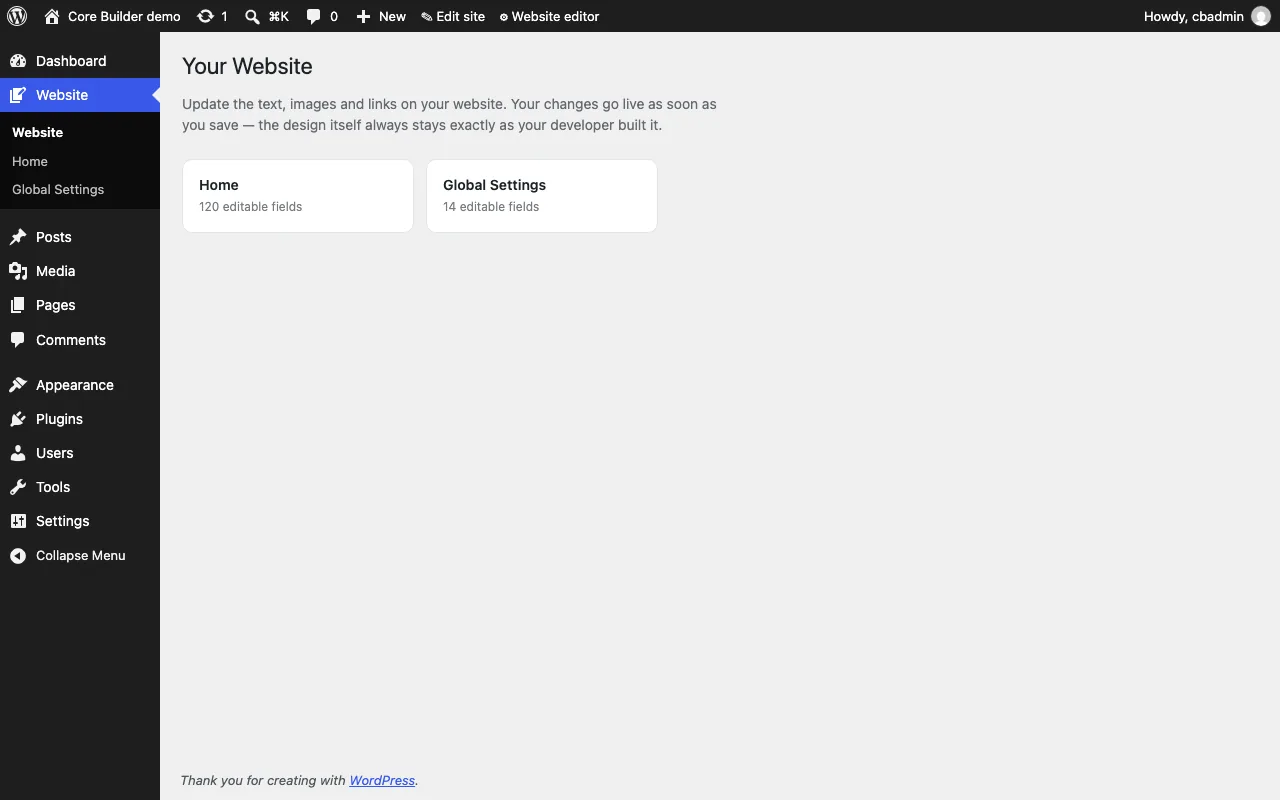
The Website panel
Home, 120 fields · Global Settings, 14
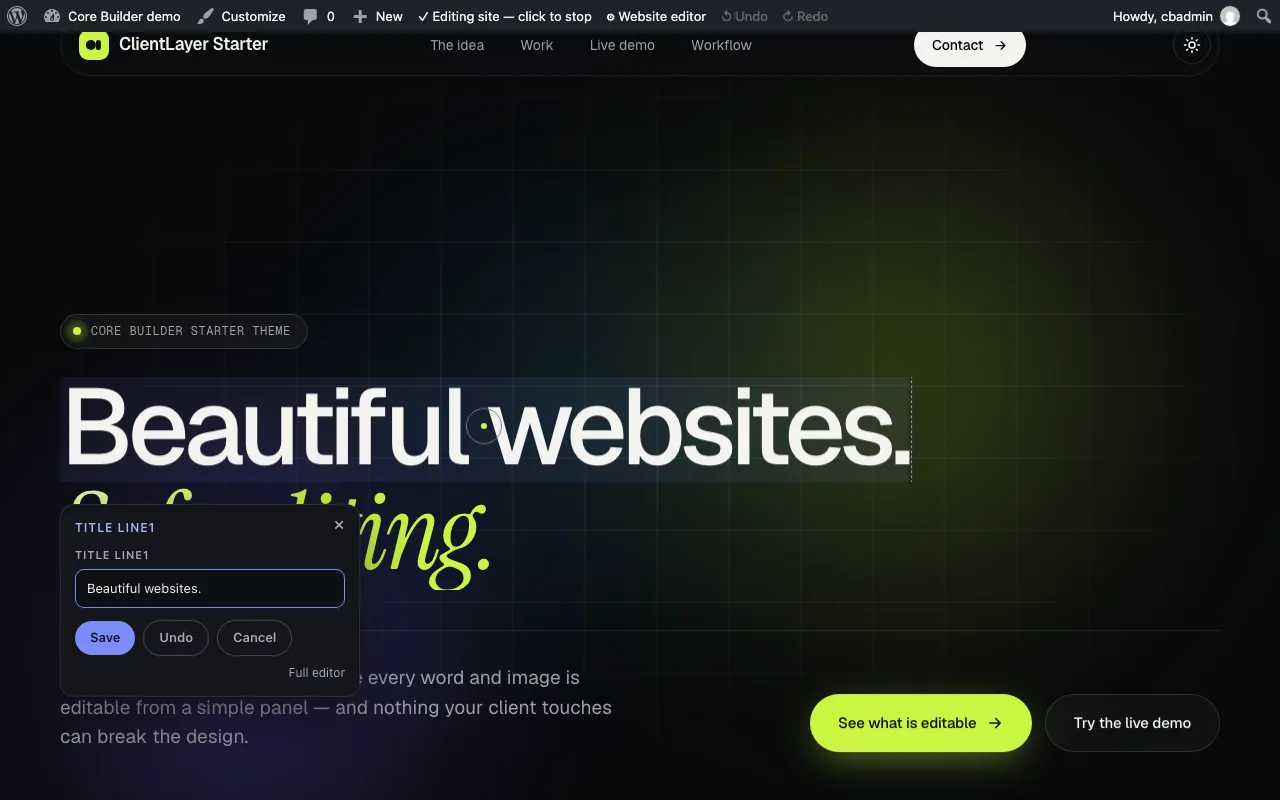
Click to edit
Any outlined text on the live page
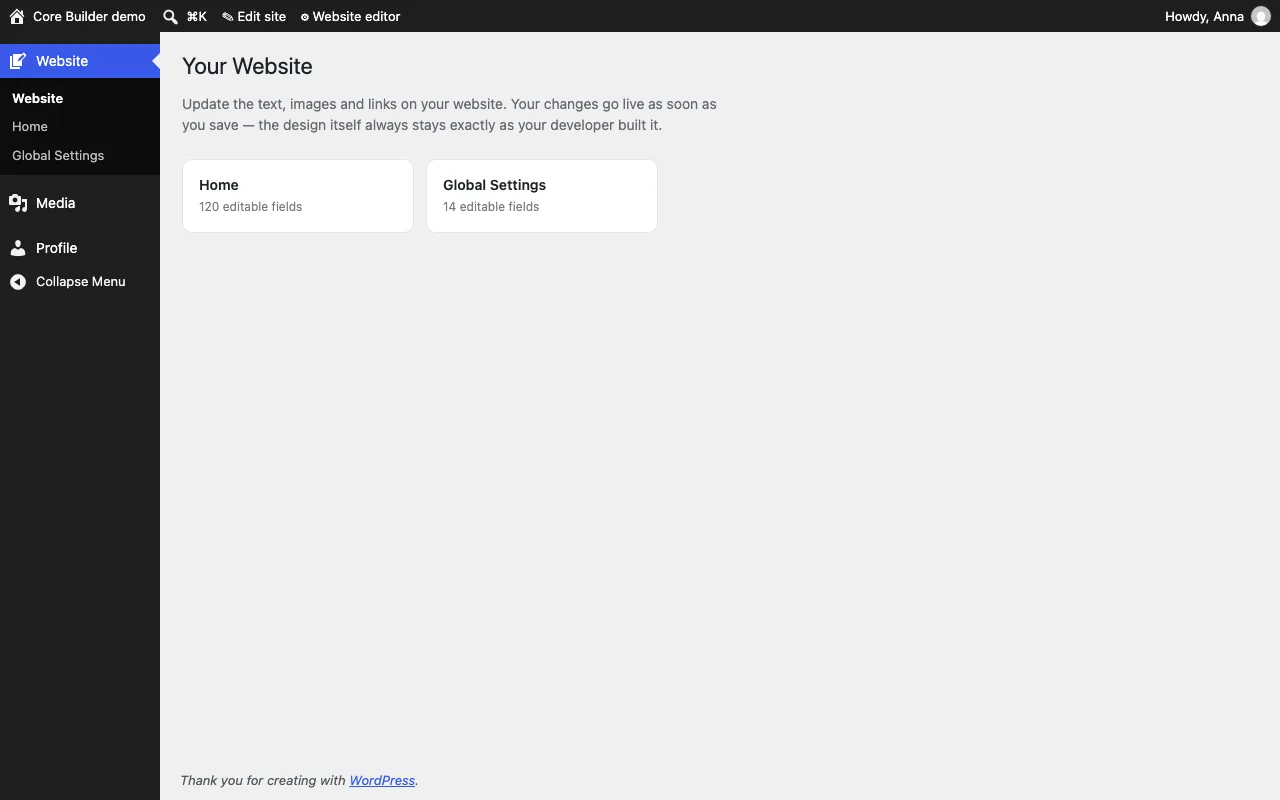
The client’s account
Website, Media and Profile, nothing else
History
Restore any of the last ten versions
For your business
What a tool like this does for a company.
Core Builder is one of the AI tools we built and use on every custom site. We build the same kind of tool for businesses: one job, done reliably, on infrastructure you control.
Your site, your words
Change prices, photos, offers and opening lines yourself, the same day, without a developer and without a page builder.
A design that stays designed
Your team edits content; the layout, spacing and styles we built can’t be changed by accident.
Safe to hand to anyone
The client account sees only the website editor and the media library, and every change can be undone.
Updates without risk
When we improve the site, your content stays exactly as you left it, because code and content are stored apart.
Questions
Before you ask.
Is Core Builder a page builder?
No, the opposite. A page builder lets anyone move anything. Core Builder lets clients change words, pictures and links, and keeps the layout in code.
Where does AI come in?
Our developers build each theme with an AI coding assistant, working to written rules: the brief is read and approved first, a contract says what may be editable, and the checklist only counts checks that were really done. Then the tools check the work: scan, validate and an error test of every file before anything goes live.
Can a client break the site?
The client account reaches the website editor, the media library and its own profile. Everything else is hidden, refused or sends them back to the editor, and every text is cleaned before it is saved.
What if someone changes something by mistake?
Undo appears right after each save, the admin bar keeps Undo and Redo for the session, and the panel keeps the last ten versions of every field to restore with one click.
Does it work with Elementor?
Yes. Pages built in Elementor keep the theme’s header and footer, and Elementor stays a developer tool, hidden from the client.
What is ClientLayer?
The name of Core Builder’s WordPress plugin and its command-line tool, the two parts you see in the screens on this page.
Want a tool like this for your team?
Tell us the job that eats your team’s week. We’ll tell you honestly whether AI belongs in it, and what it would take.